1
Fill in information
2
Confirm information
3
Select exam date & pay fees
Personal information*
Personal information
Detail
Migii JOPT
Size: 4x6cm, JPG/JPEG/PNG format, capacity under 2MB
Migii JOPT
Plain background, white background is recommended
Migii JOPT
Do not wear glasses, do not use accessories such as sunglasses, headphones, hats, masks
Migii JOPT
Photo clearly shows both shoulders, face occupies about 70-80% of the photo height
Migii JOPT
Photo taken within the last 6 months from the time of registration
Sample photo
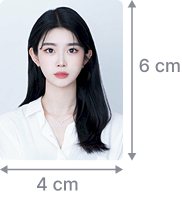
Sample
Candidate photo  *
default_photo
Migii IconUpload photo
Exam Information*
Years
Months
Next
Edit image size
Resize your ID photo to fit the required aspect ratio
Close
Crop image

Photo and Document Requirements

ID Photo Requirements

1. Digital Photo Dimensions
  • Printed size: 4 cm × 6 cm
  • File format: JPG/JPEG/PNG
  • File size: Under 2MB
2. Content Requirements
  • Background: plain, no patterns or shadows (white background recommended)
  • Face: looking straight, serious expression, both ears and eyes visible
  • Clothing: formal
  • No glasses or accessories such as sunglasses, headphones, hats, or masks
  • Lighting: even, no shadows, glare, or color distortion
  • Framing: should show both shoulders, face occupies about 70–80% of photo height
  • Photo must be taken within the last 6 months
3. Invalid Cases:
  • Selfies or cropped group photos
  • Photos with excessive filters making recognition difficult
  • Blurred or pixelated images
  • Wrong aspect ratio or oversized files
  • Improper background, objects or people in background

National ID (CCCD) Requirements

1. Clear Front Side
  • Must show front of CCCD (photo, full name, ID number...)
  • All 4 corners visible, no cropping
  • No blur, glare, or smudged text
  • No filter, beautification, or editing
2. Back Side
  • Photo of the back with visible chip and QR code
3. Lighting and Background
  • Take in natural light, avoid darkness or yellow light
  • Place CCCD on plain surface with no patterns or objects
4. Format and Size
  • File format: JPG, JPEG, or PNG
  • File size: under 5MB
  • No blur, rotated, or cropped edges

Passport Requirements

1. Passport Information Page
  • Must include portrait, full name, passport number, and nationality
  • All 4 corners visible, no cropping
  • No blur, glare, or smudged text
  • No filters, editing, or beautification
  • Take in natural or soft white light
2. Format and Size
  • File format: JPG, JPEG, or PNG
  • File size: under 5MB
3. Other Requirements
  • Passport must be valid
Confirm
Close
Migii JOPT
Email Verification
A verification code has been sent to your email error. Enter the 6-digit verification code to continue
Didn't receive the code?  Gửi lại sau 30s
Next
Exam registration successful
We have sent your registration form and receipt to your email address. Please check your email.
Logo
Thông tin liên hệ
Hotline: (+84) 961.285.987
Địa chỉ: số 315 Trường Chinh, Khương Mai, Thanh Xuân, Hà Nội
People care
iconRegister exam
iconPolicies & Guidelines
iconHỗ trợ
jlpt logotoe logotopik logo
Bản quyền thuộc về Công ty Cổ phần Công nghệ EUP
Giấy phép ĐKKD số 0107482236 cấp ngày 23/06/2016. Giấy phép số: 67/GP - BTTT cấp ngày 02/02/2018